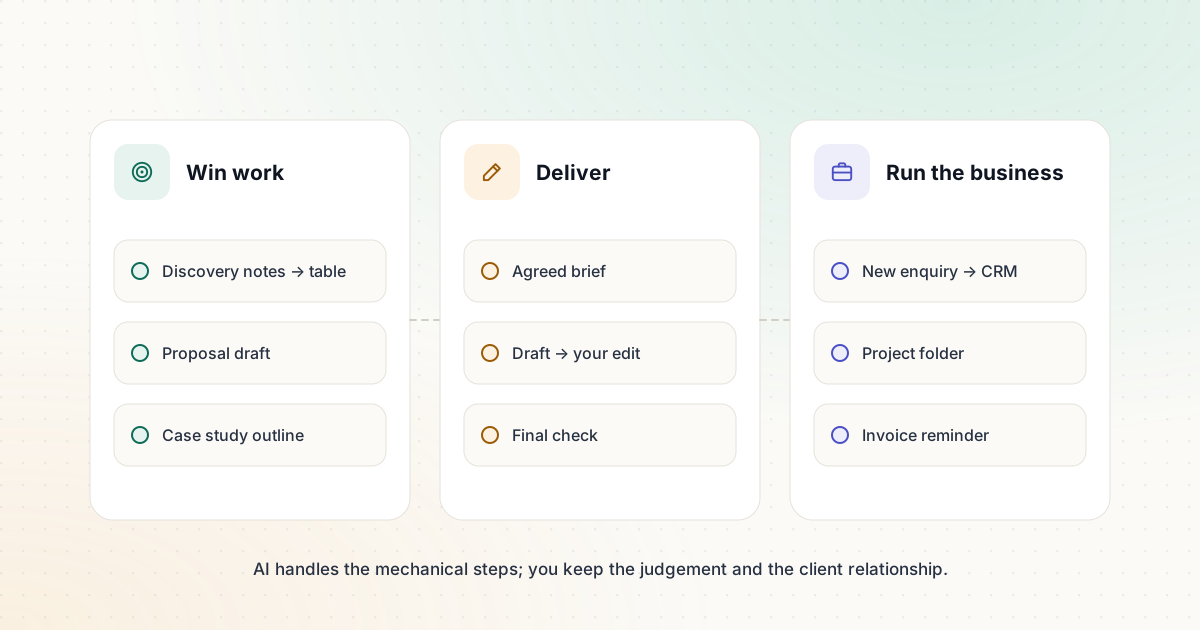
As a freelancer, every hour you spend on proposals, admin and formatting is an hour you can’t bill. AI can take a big share of that work off your plate. Used carelessly, it can also make your work sound generic and put client confidentiality at risk. This guide covers practical workflows across the three parts of freelance work — winning it, delivering it and running the business — plus the rules that protect your reputation.
Winning work
Proposals from discovery notes
After a discovery call, you usually have messy notes and a proposal to write. A good workflow:
- Transcribe or type up the call notes (with the client’s permission if you record).
- Ask an assistant such as Claude or ChatGPT to extract the client’s goals, constraints, deadlines and stated budget into a table.
- Check the table against your notes — this is where misunderstandings get caught.
- Draft the proposal from the table using your own proposal template, then rewrite the opening paragraph yourself so it reflects the conversation.
The extraction step is where AI saves the most time. The opening paragraph is where clients decide whether you understood them, so that part should be yours.
Case studies that sound specific
Turn finished projects into short case studies: problem, approach, result, client quote (only if you have permission). AI can structure a first draft from your project notes, but the specifics — real numbers you can stand behind, real decisions you made — are what make a case study persuasive.
Delivering work
Start every project with a brief
A clear brief prevents rework. Our free Content Brief Generator turns a topic, audience, goal and key points into a structured brief with sections, questions to answer and a quality checklist. Share it with the client before you start; agreeing on the brief is much cheaper than revising a finished draft.
First drafts and editing
- Use an assistant for structure and first drafts when speed matters more than voice, then edit heavily.
- Use an editor such as Grammarly as a final pass for clarity and consistency. Its free plan includes 100 generative AI prompts per month; Pro adds tone adjustment and plagiarism detection.
- Keep a personal style file: your preferred structure, phrases you avoid and two samples of your best work. Include it whenever you ask for a draft.
Audio and video
If you produce podcasts, webinars or interviews, Descript lets you edit by editing the transcript; its free plan includes transcription and text-based editing. For calls and interviews you only need to document, Otter.ai transcribes Zoom, Teams and Google Meet meetings.
Running the business
Automation platforms handle the repetitive admin around your work. With Zapier, whose free plan supports two-step automations, you can:
- add every new enquiry from your website form to a spreadsheet or CRM,
- create a project folder when a client signs,
- remind yourself to send an invoice when a project is marked complete.
The admin automation workflow has step-by-step versions, and our productivity templates include a weekly review prompt that keeps your pipeline visible.
Protecting client trust
This is where freelancers get into trouble. A few rules prevent most problems:
- Check your contracts. Some clients prohibit or restrict AI use, especially with confidential material. If a contract is silent and the work is sensitive, ask.
- Keep confidential material out of consumer AI tools unless you have checked the provider’s data terms and settings. For example, OpenAI lets individual ChatGPT users turn off model training on their conversations in Data controls.
- Remove identifying details before using real client material in a prompt.
- Be honest about how you work if a client asks. Many clients are comfortable with AI-assisted drafting when a skilled person remains responsible for the result.
- Check every fact. You are accountable for the work you deliver, regardless of which tool produced the first draft.
Pricing when AI makes you faster
If you charge by the hour and AI halves the time a task takes, you’ve halved your income for that task. Many freelancers move toward project or value-based pricing for work that AI speeds up, and use the saved time to offer more strategy, research or revision rounds. Whatever model you choose, price the outcome you deliver and the expertise you bring.
A simple weekly system
| When | Workflow | Tools |
|---|---|---|
| After every call | Notes → decisions and action items | Transcription + assistant |
| Before every project | Brief agreed with the client | Content Brief Generator |
| During delivery | Draft → your edit → final check | Assistant + editor |
| Friday | Weekly review: pipeline, invoices, next week | Assistant + your task list |
| Always on | Enquiries, folders, invoice reminders | Automation platform |
Start with the workflow that costs you the most unbilled time, run it for two weeks, and keep it only if it saves time without lowering quality.
Sources and further reading
We link to official documentation and primary sources. Product details change — check the source before relying on a specific limit or price.
- Data controls in ChatGPT (OpenAI Help Center) help.openai.com
- Grammarly plans grammarly.com
- Descript pricing descript.com
- Zapier pricing zapier.com