Demos are designed to impress. Your work is messier. The only reliable way to choose an AI tool is to test it on your own tasks, with the same examples for every option, and to look beyond output quality at data handling, integration and cost. This guide gives you a method you can reuse for every purchase.
1. Define the job before you look at tools
Write one or two sentences that describe the job and how you’ll know it’s done well:
“Draft first replies to customer emails about orders, in our tone, so an agent can send them after a quick check. Success: at least most drafts need only light edits, and we save time per email.”
This keeps you from being distracted by features you don’t need. It also tells you what to measure — in this example, edit effort and time per email.
2. Build a small test set
Collect 10 to 20 real examples of the task. Include easy cases, typical cases and a few awkward ones (a vague request, an angry customer, an unusual product). Remove names, contact details and anything confidential before using them in a trial.
Use exactly the same test set and the same instructions for every tool you evaluate. Otherwise you are comparing your prompts, not the tools.
3. Score the output
For each example, score the result on a simple 1–3 scale:
- 3 — usable with minor edits
- 2 — useful but needs significant editing
- 1 — not usable or factually wrong
Note why anything scored 1. Factual errors and invented details matter more than awkward phrasing, because they are harder to spot.
4. Look beyond the output
Good output is necessary but not enough. Check the following for every shortlisted tool, using the vendor’s official pages.
Data and privacy
- Is your content used to train models? Can you switch that off? For example, OpenAI documents a Data controls setting for individual ChatGPT users and states that Business, Enterprise and Edu workspace content isn’t used for training by default.
- How long is data kept, and can you delete it?
- Where is data processed, and does that matter for your customers or contracts?
- What admin controls exist — single sign-on, user management, audit logs? Plan pages often reserve these for higher tiers. Notion, for example, lists zero data retention with its AI model providers on its Enterprise plan.
Integration
- Does it work where the work happens — your email, documents, help desk or store — or will people copy and paste?
- Is there an official integration, or will you rely on an automation platform?
- Can you export your data and settings if you leave?
Cost model
AI tools charge in very different units: seats, credits, tasks, conversations, resolutions or outcomes. Estimate a realistic month of usage and calculate the cost for each tool. Pay attention to what happens when you exceed a limit — does the tool stop, slow down or charge more?
Reliability and support
- Is there a status page and a support channel that fits your plan?
- How often does the product change? Fast change is fine, but check how changes are communicated.
5. Use a weighted scorecard
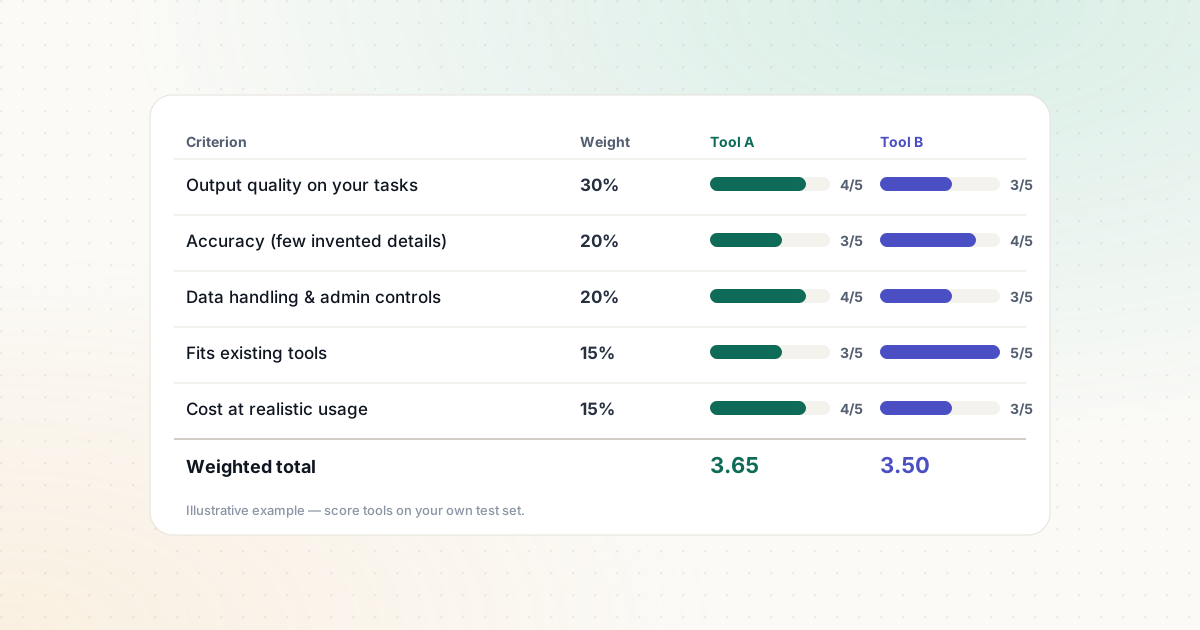
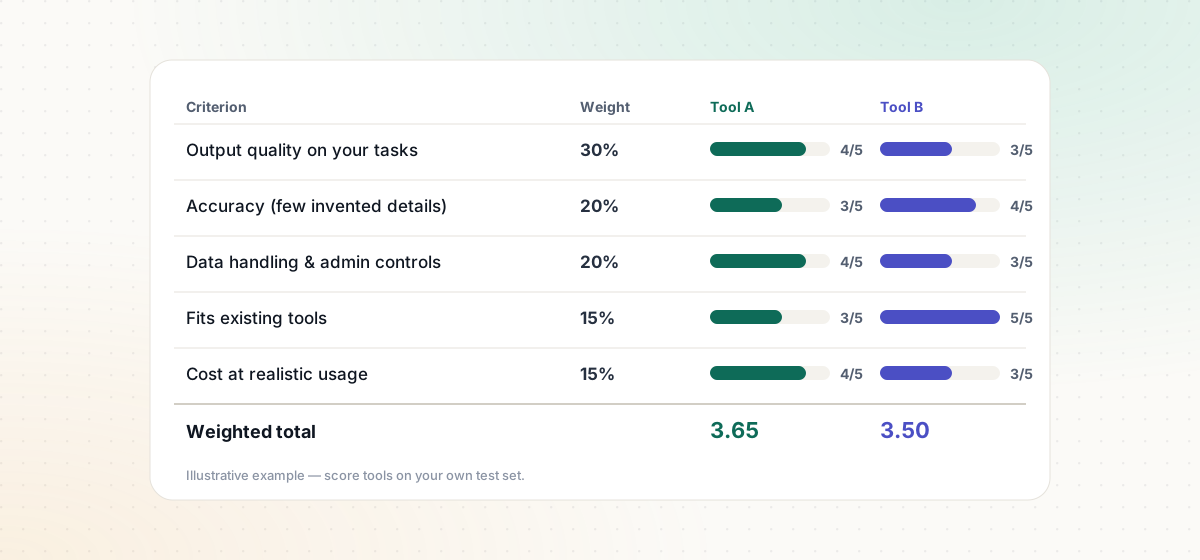
Weight each criterion by how much it matters for this job, then score each tool from 1 to 5.
| Criterion | Weight | Tool A | Tool B |
|---|---|---|---|
| Output quality on your test set | 30% | ||
| Accuracy (few invented details) | 20% | ||
| Data handling and admin controls | 20% | ||
| Fits existing tools and workflow | 15% | ||
| Cost at realistic usage | 15% |
Multiply each score by its weight and add them up. The total won’t make the decision for you, but it makes trade-offs visible and easy to discuss with your team. Our business automation templates include a copyable version of this scorecard.
6. Watch for red flags
- Guaranteed results — “100% accurate,” “never makes mistakes,” guaranteed rankings or revenue.
- No clear answer on data use — if the sales team can’t point you to documentation, assume the worst.
- Pricing you can’t estimate — unclear limits, hidden overage charges or “contact us” for basic plans.
- Actions without controls — tools that can send, publish, refund or delete without approval steps or limits. The OWASP Top 10 for LLM applications calls this risk “excessive agency.”
- Lock-in — no export, or your prompts and settings can’t be moved.
7. Run a short pilot, then decide
After scoring, pilot the best option for two to four weeks with a small group on real work. Keep the human review step in place. At the end, compare the time spent and the errors caught against your baseline, and decide: adopt, adjust or drop.
If you want a more formal structure, NIST’s voluntary AI Risk Management Framework organizes AI risk work into four functions — Govern, Map, Measure and Manage — and has a companion profile for generative AI.
How we use this method on Algorixio
Our comparisons apply the parts of this checklist that can be verified from official sources: plans, features, integrations, billing units and data controls. We don’t publish scores for output quality unless we have actually tested the tools, and we say so on every page. Read our comparison methodology for details.
Sources and further reading
We link to official documentation and primary sources. Product details change — check the source before relying on a specific limit or price.
- AI Risk Management Framework (NIST) nist.gov
- Data controls in ChatGPT (OpenAI Help Center) help.openai.com
- Notion pricing (AI and data retention by plan) notion.com
- OWASP Top 10 for LLM Applications 2025 genai.owasp.org